Burning Bridges AI guide
How to Make a Burning Bridges AI Video From One Photo
One portrait supplies the lead; the template supplies the chandelier lounge, crowd and cup performance. You do not need to film the gestures or find a reference clip. The useful choices are your photo, the framing and what you want to do with the audio after downloading.
By VidMello · · 6 min read
1. Choose the face and outfit, not the party background
Use a sharp, front-facing portrait with visible eyes and mouth. A waist-up photo makes the face and visible clothing easy to read; a selfie or full-body image can also work when the face remains large and clear. Avoid sunglasses, strong side profiles and heavy filters that obscure the features you want to recognize.
You do not need to hold a cup or recreate the room. In the first example, the source portrait becomes the lead in a new landscape party scene. The template supplies the environment and movement. Your background is not preserved, and the surrounding people are not extracted from a group photograph.
Actual input → Complete generated video
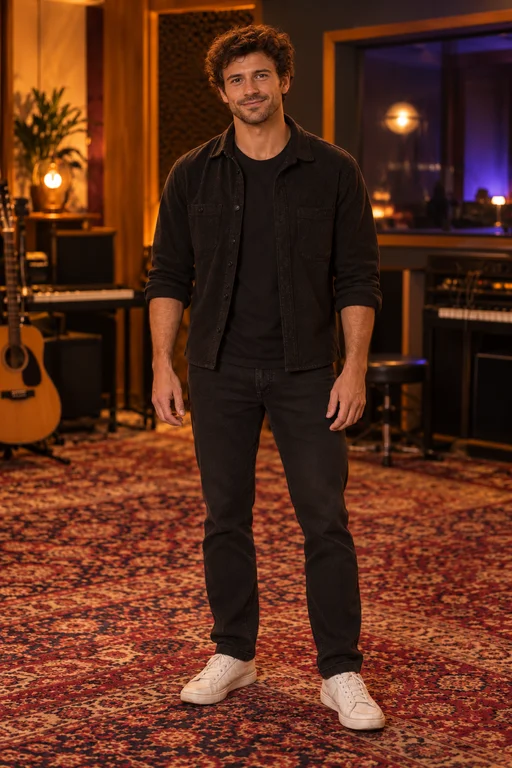
One photo. Your moment in the spotlight.
15 seconds · 16:9 · Music included
The actual black-clothing portrait and its complete landscape result. Compare face and hair before the performer turns or raises a hand near the camera.
People in these examples are AI-created adult characters, not customer uploads. Your result can vary.
2. Choose the composition before you generate
Landscape 16:9 gives more room to the crowd and lounge. Portrait 9:16 creates a native vertical performance for a phone-screen post. Both request about fifteen seconds at 720p and use the same 10 Credits. One submission produces the selected format, not a pair of exports.
The purple-sweater example below was generated separately in portrait. Watch the lead, cup and camera interaction rather than expect it to copy the wide example’s movement exactly. A new vertical result can use different framing and gestures. Downloading an existing landscape clip again will not turn it into a native portrait scene.
Actual input → Complete generated video
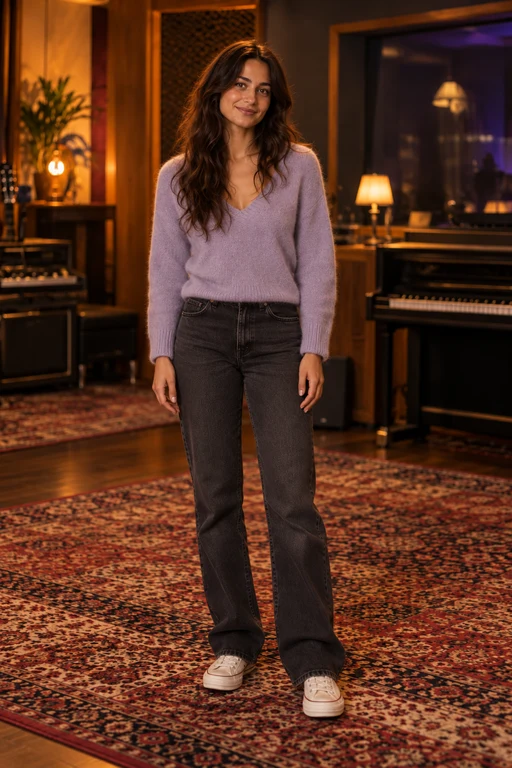
Reference photo
About 15 seconds · Vertical 9:16 · 720p · Music included
The actual portrait reference and its native 9:16 result. This is a separate generation, with its own framing and gesture timing.
People in these examples are AI-created adult characters, not customer uploads. Your result can vary.
3. Review the photo, cost and submission
Upload one JPG, PNG or WebP up to 10 MB. Use your own photo or one adult who agreed to appear. Selecting the image previews it on your device; it is not a generated preview. The Starter pack costs $9.90 once for 10 Credits, enough for one video at the current 10-Credit cost. There is no subscription or automatic renewal.
Confirm photo permission and sign in when prompted. If your balance covers 10 Credits, you can use it without buying another pack. After payment confirmation, return to your selected photo and format, then explicitly start the generation. Buying a pack is separate from creating a video.
Submit once and wait for the job to be accepted. Processing continues on the server if you leave the page. Open private History and refresh for status, then preview the completed result. The fifteen-second duration describes the output; queue and processing times vary.
4. Pick the download that matches your sound plan
The main MP4 includes the demo soundtrack. If that is the sound you want, preview it and download the finished video from History. VidMello adds no watermark and does not require a separate HD purchase or extra Credits to download.
If you plan to add another permitted track in TikTok, Reels or an editor, choose Download without music in History. This removes audio from the completed Burning Bridges result without generating new visuals or using more Credits. It keeps the same framing and expiry date, and also works for older completed landscape results while their files remain available.
There is no custom audio upload in the workbench. Music is added after visual generation, so it does not direct the mouth or cup gestures word by word. Review any new track against the finished movement rather than assume the performance has been retimed to it.
5. Check the face during the moments that can hide it
The close gesture, turn to the crowd and hand-over-eyes finish temporarily change or hide the facial features you use for recognition. Watch those sections all the way through. Check the hand around the cup as well as the face; a good opening frame alone is not a complete review.
A clear portrait can help the model but cannot guarantee every expression, outfit detail or camera move. If a delivered result disappoints you, identify a concrete issue before another attempt. A new generation uses another 10 Credits. A technical failure before delivery returns reserved Credits; a completed creative difference is not an automatic free reroll.
Save the file within the retention period of up to 30 days. Your result is private by default and is not automatically added to these public examples. There is no self-service delete button; deletion requests go through the contact details in the privacy policy.
Frequently asked questions
Do I need a photo holding a cup?
No. A clear portrait supplies appearance. The template supplies the cup, lounge, crowd and performance; you do not need to pose or film the actions.
Can I add friends as separate background characters?
No. This workbench accepts one human lead. The surrounding people are generated; group photos, extra friend portraits and pet inputs are not supported by this template.
Does Download without music create a second video generation?
No. It removes the audio from the completed result without extra generation Credits. The visuals, framing and expiry date stay the same.
Can I convert an old landscape result into native portrait?
Not by changing a download option. Select 9:16 before a new generation. Reframing a wide file in another editor is a crop, not a new native portrait performance.