Bby Wow Guy Dance Template guide
How to Make a Bby Wow Guy AI Video From One Photo
You do not need a video of yourself dancing, a piece of bread or a carefully copied pose. VidMello’s Bby Wow Guy template takes one portrait and builds the party performance around it. This walkthrough uses our two published photo-to-video examples so you can see exactly what the photo contributes before spending Credits.
By VidMello · · 6 min read
First, compare the two photos with their finished videos
In the first example, a curly-haired man in dark clothing becomes the party performer. The source portrait contains neither the venue nor the bread. Watch the approach, the hand reaching the mouth, the chewing expression and the turn away: these are generated parts of the performance.
The second example starts with a different adult character in a blue shirt. You can recognize that different appearance in the party scene, but the bite and facial expression are not an identical replay of the first result. Both inputs are AI-created adult character photos. They show two actual outputs, not a claim that every portrait will preserve every feature equally well.
Actual input → Complete generated video
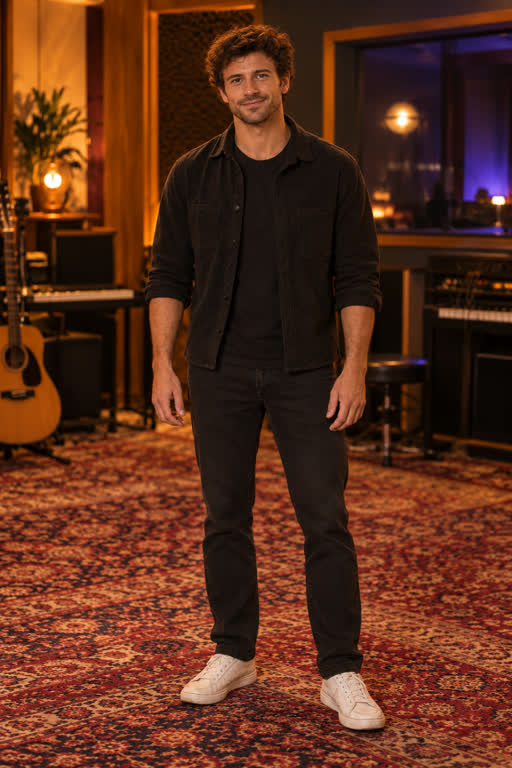
Actual input photo (AI-created adult model)
7 seconds · 9:16 · 720p · Music
Example 1: the curly-haired character’s actual input portrait and complete generated party performance.
People in these examples are AI-created adult characters, not customer uploads. Your result can vary.
Actual input → Complete generated video
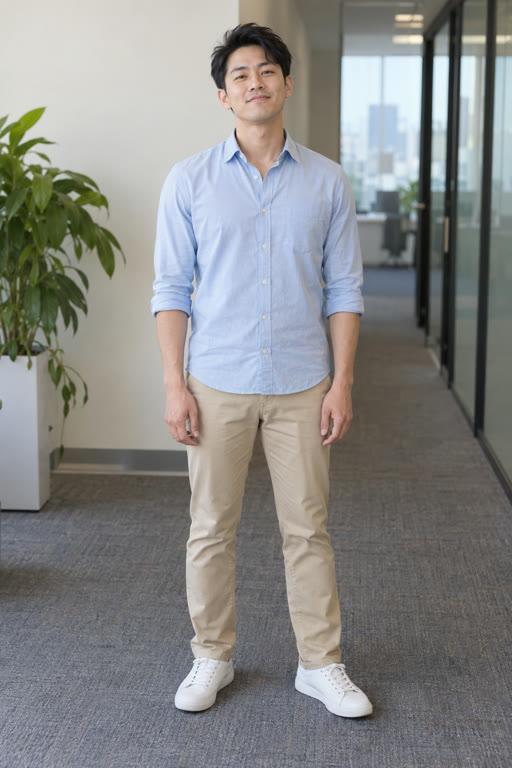
Actual input photo · AI-created adult model
7 seconds · 9:16 · 720p · Music
Example 2: a blue-shirt character, a new generated performance, and different chewing and expression details. Open the input photo to compare the face.
People in these examples are AI-created adult characters, not customer uploads. Your result can vary.
1. Choose a face the video can keep referring to
Use a sharp, front-facing photo with the full head visible and even light across the eyes and mouth. A head-and-shoulders or waist-up portrait is enough; a full-body shot is optional. Leave a little space above the hair rather than cutting the head off at the edge.
Do not copy the meme’s chewing expression in the photo. A natural expression gives the template a clearer starting appearance. Sunglasses, a hand covering the mouth, strong profile angles and heavy beauty filters hide the features you will want to recognize during the bite. Clear glasses can still be difficult if reflections cover the eyes.
The current preset is built around a male party performer, and the two verified public examples use adult men. We have not validated women’s portraits for this preset. Choose an adult photo you own or have permission to use; this page does not ask for a reference video.
- One person per image; avoid a group photo with several possible subjects.
- One JPG, PNG or WebP, up to 10 MB.
- No bread, dance pose, exposed teeth or party background required.
2. Upload your photo, then check the pack and cost
Open the template’s Upload your photo step and inspect your selection. Selecting a photo is free and previews it on your device. Confirm that you have permission to use it, then sign in when prompted. Your photo is not submitted for generation just because you chose it.
The Starter pack costs $9.90 once for 10 Credits, enough for one video at the current 10-Credit cost. There is no subscription or automatic renewal. If you already have at least 10 Credits, you do not need another pack. If you buy one, wait for payment confirmation and return to your saved photo. Purchasing Credits and creating the video are separate actions.
There is no free personalized video preview or later HD unlock in this workflow. The complete public examples are available to watch before you buy; the personalized render requires Credits before it starts.
3. Start generation yourself, then open History
Check the selected photo and the output specification beside the generation action: approximately seven seconds, portrait 9:16, 720p, with demo music. There is no aspect-ratio selector or custom prompt to complete for this template. Click Generate video · 10 Credits once when you are ready.
Once the request has been accepted, it runs on the server. You can leave the page and return to private History to check the status; refresh History for an updated status. Allow several minutes, with longer waits possible when the provider queue is busy. Clip length is not a promise about processing time.
4. Watch the bite and the turn before downloading
Play the whole result in History. Check whether the person remains recognizable when the hand or bread crosses the mouth, whether chewing changes the teeth or cheeks, and whether the face still makes sense during the turn. The final expression and the timing of the bite can differ from the examples.
Download the MP4 while the file is available; media is retained for up to 30 days. VidMello adds no watermark and does not charge a separate download or HD-unlock fee. Save a local copy rather than relying on a temporary access link.
The sample’s music excerpt is included in the file. If you attach another sound in TikTok or Reels, check the two audio levels so you do not accidentally play both tracks over one another. The included excerpt does not guarantee the bite lands on the same musical beat in every generation.
If the result looks different from the sample
A good source photo cannot lock every frame. Hair, clothing, mouth shape, hands, camera framing and the deadpan expression can change as the model creates the scene. The public samples are useful comparisons, but they are not a promise that your portrait will perform the exact same bite.
Before another attempt, identify the visible problem: was the original face too small, the mouth covered or the head partly cropped? A clearer portrait is a reasonable change to try, not a guaranteed fix. Every new generation costs another 10 Credits. A technical failure before delivery returns reserved Credits; an already delivered result with a creative difference does not automatically include a free redo.
Frequently asked questions
Can I use a normal selfie instead of a full-body photo?
Yes. A clear head-and-shoulders or waist-up portrait is enough. Keep the full head, eyes and mouth visible; you do not need to hold bread or copy the dance pose.
Will buying a pack automatically make the video?
No. After payment is confirmed, return to the saved photo and explicitly click Generate video · 10 Credits. If you already have enough Credits, skip the purchase.
Can I watch a personalized preview before paying?
No. Watching the public samples and previewing the selected photo are free. A personalized video requires Credits before generation; there is no pay-to-unlock preview or separate HD purchase.
Will my clothes, face and bite match exactly?
No. The photo guides your appearance in a new scene. Clothing details, facial expression, chewing, hands and action timing can vary, particularly during occlusion and turns.
Where is the finished video?
In your private History. Refresh to check status, then preview and download the MP4. Save it within the retention period of up to 30 days.