Pick It Up Dance AI: The Trend, the Moves, and How to Make One
Pick It Up, Make It Jump and Put Your Hands Up are overlapping search names for a dance built around raised arms, a turn and a low, wide-stance bounce. The AI version lets a photo supply the dancer. Before choosing a tool, check the complete example: similarly named templates can have different lengths, movements and backgrounds.
By VidMello · Updated
Open the Pick It Up studio ↗Which Pick It Up dance does this mean?
Here, the name refers to the routine associated with the call to pick it up, make it jump and put your hands up. A title alone is not enough to identify the sound: unrelated songs and older routines can share the phrase. Compare the linked dance references and the visible moves before selecting a template.
The reference pages link TikTok performances and associate the sound with DJZACKKK. We have not independently verified the DJ’s first upload date, the original choreographer or the first AI version. Those are separate credits: a sound creator, a dancer in a reference and someone who made an AI template need not be the same person.
The actual full-body photo → the complete Pick It Up sample
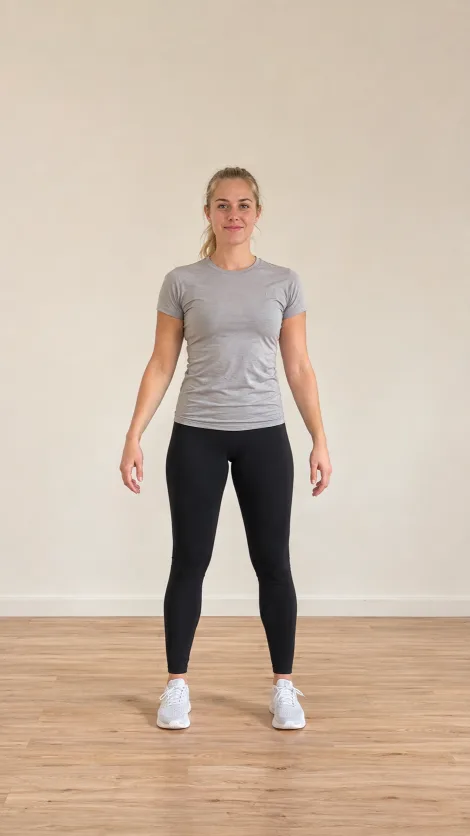
Actual input photo
This published example uses an AI-created adult character and is 480p. Follow the raised arms, back-facing turn and low bounce through the whole clip. The photo guides the room and outfit, but cropping, hands and identity can change. This is a VidMello result, not the original creator’s dance recording.
Use the movement sequence to identify the version
Look for arms extending outward, hands lifting above the head, a turn that shows the dancer’s back, and a return to the front before the low, wide stance. Some references finish with a spring upward. The ending and timing vary; our template is described by its published samples rather than a promise to reproduce every beat.
A filmed cover records actual dancing. The photo version synthesizes body movement from prepared references. No dance recording or prompt is required in this studio. The room and clothes are guided by the uploaded photo, unlike Firestarter’s prepared purple stage. Pick the template based on that difference as well as the song name.
Make a Pick It Up video from one photo
- Open Pick It Up and compare the full examples, their input photos and each sample’s actual resolution.
- Select one JPG or PNG full-body photo and confirm permission. Pick 480p or 720p, then check the displayed Credits.
- Sign in. If necessary, buy a one-time Credit pack. Purchasing restores the studio flow; it does not automatically generate your dance.
- Explicitly submit the generation. Follow that job in private History rather than sending another request to check whether it is ready.
- Play the result from beginning to end, inspect the turn and low stance, then download with audio or Silent. Add an authorized sound if needed.
Current VidMello cost
480p: 5 Credits; 720p: 10 Credits. Lite $6.99 buys 5 Credits for one 480p video; Starter $9.90 buys 10 Credits for one 720p video or two at 480p. Packs are one-time purchases, share one balance across templates, and do not start a video automatically. No subscription. Sample playback and local photo selection are free; generation requires Credits.
Compare VidMello, AI Dance and MakeViral
Public pages checked November 8, 2026; competitor specifications are provider claims, not our generation tests. Credits cannot be compared numerically across services. Check the final price and local availability before paying. Genjutsu’s page could not be retrieved for this review, so we do not assign it invented specifications or a ranking.
Scroll horizontally to compare all fields
| Tool | Input | Movement / scene control | Output | Audio | Price | Best fit |
|---|---|---|---|---|---|---|
| VidMello | One photo | Prepared dance · Photo-guided setting | ≈14s · 9:16 · 480p / 720p | Audio + Silent MP4 | 480p: 5 Credits / 720p: 10 Credits. Lite $6.99 / Starter $9.90 | Prepared photo workflow |
| AI Dance ↗ | One photo | Preset | 11s; 9:16; resolution undisclosed | Music | 1 credit; $4.49 pack | Shorter cut |
| MakeViral ↗ | One photo | Person / baby / pet | 14s; 720p; 9:16 | Sound | From 57 credits | Subject variants |
Frame the photo for raised arms and a low stance
Use one person facing the camera, head to toe, with the hands separated from the torso. Leave empty space above the head, beside the arms and around the feet. A vertical image with a clearly readable outline is easier to evaluate than a cropped selfie or a crowded scene. Do not expect the model to recover details outside the photo.
Check the face again after the turn and the legs during the low bounce. Hands may merge, feet may leave the frame and clothing or background details may drift. 720p offers a larger image, not a guarantee of better anatomy. The adult and toddler examples on the template page are individual outputs, not measured success rates for every age or photo.
- Use your own photo or an adult subject’s consent and appropriate image rights.
- For a child’s photo, a parent or guardian must authorize its use; review the result before sharing.
- Avoid multiple people, limbs overlapping another body, and a ceiling so low that raised hands have no room.
Download with music, or add your own authorized sound
Private History offers an audio MP4 and a Silent MP4 without extra download Credits. The music version uses the prepared demo track, not a promise of TikTok original-sound attribution. The page’s phone frame, social icons and @vidmello preview label are not added as a VidMello watermark to the downloaded MP4.
For another track, download Silent and add a sound you are permitted to use in your editor or publishing app. The download does not grant commercial music rights. Check the terms for your publication, especially ads or reposting to another service, and follow any AI disclosure requirements. Preview the entire file before posting it.
Frequently asked questions
Are Make It Jump and Put Your Hands Up different templates?
Those names overlap with Pick It Up for this routine. Match the reference dance and visible sequence, not only the words in a title; unrelated songs can use the same phrase.
Does my room become the background?
The photo guides the person, clothing and setting. It is not an exact preservation promise: objects, textures, framing and identity can change during the generated motion.
Will the download contain the phone frame or a VidMello watermark?
No VidMello watermark is added to the downloadable MP4. The phone frame, social icons and @vidmello label belong to the page preview. Review your file before sharing.
Can I use the Thai guide to create a video?
Yes. The guide is translated, but the Pick It Up studio is currently available in English, Spanish, Portuguese and French. The Thai guide links to the existing English studio and labels that destination clearly.
Is this free, and what does generation cost?
480p: 5 Credits; 720p: 10 Credits. Lite $6.99 buys 5 Credits for one 480p video; Starter $9.90 buys 10 Credits for one 720p video or two at 480p. Packs are one-time purchases, share one balance across templates, and do not start a video automatically. No subscription. Sample playback and local photo selection are free; generation requires Credits.